Blur TikTok Video Backgrounds Online with BGBlur — AI Background, Face, License Plate and Object Blur for Privacy-Preserving Exports and Redaction
Whether you're filming in public spaces, capturing spontaneous moments, or just want a cleaner aesthetic here's how BGBlur makes background blur in video content effortless, with AI that handles face…
Introduction
Creating engaging TikTok content while protecting privacy has become a crucial concern for creators in 2025. Whether you're filming in public spaces, capturing spontaneous moments, or simply want a cleaner aesthetic, the need for a reliable TikTok video editor that can handle background blur in video, faces, and license plates has never been greater.
Think about how many videos get uploaded every single day with something in the background that wasn't supposed to be there. A stranger walking through the shot. A neighbor's car parked in the frame. Personal mail sitting on the counter. A messy room that wasn't cleaned up before filming. These things happen especially for creators who shoot spontaneously or in public spaces rather than in a controlled studio environment.
For most creators, the choice used to be: either reshoot the clip, spend an hour manually editing, or just post it and hope nobody notices. None of those options are great. Reshooting kills the spontaneity that makes TikTok content feel real. Manual editing is slow, tedious, and requires software knowledge most people don't have. And just posting it exposes you and the people in your background to real privacy risk.
This is where BGBlur changes the equation entirely. It's an AI-powered video background blur tool built specifically for this problem and it works in minutes, not hours, directly in your browser.
Why Privacy Matters in TikTok Videos
Every day, millions of TikTok videos are uploaded featuring unintentional appearances of strangers, visible license plate, and cluttered backgrounds that pull attention away from the main content. Most creators don't think about this until something goes wrong a comment pointing out a visible plate, a DM from someone upset about appearing in a video, or worse, a content flag or removal.
In many countries, showing license plates or people's faces without consent isn't just inconsiderate it can have genuine legal consequences. GDPR in Europe treats vehicle registration data and facial imagery as personal information. Several US states have passed or are passing similar regulations. Platform community guidelines are also tightening, with more emphasis on consent and privacy in publicly posted content.
But privacy isn't the only reason to think about your video's background. From a pure content quality standpoint, a distracting video blur background effect where the background is softened and the subject pops makes your content look more professional, more intentional, and more visually engaging. It's the same effect you see in high-quality Instagram Reels and YouTube Shorts: the subject is sharp and clear, everything behind them is soft and out of focus.
That combination privacy protection and visual quality improvement is exactly what a good background blur tool gives you. And BGBlur does both automatically.
Introducing BGBlur: The Best Video Editor for TikTok Privacy Protection
BGBlur stands out as the best TikTok video editor specifically designed to address privacy concerns without making the editing process complicated. This AI video editing tool transforms how creators protect sensitive information in their videos, offering a comprehensive solution that goes well beyond basic editing features.
What makes BGBlur genuinely different from general-purpose video editors is that it was built around privacy use cases from the ground up. The AI models were trained specifically on the kinds of objects that need blurring in real-world creator content faces, license plates, and backgrounds rather than being a blur filter bolted onto a broader editing tool.
The result is accuracy and ease of use that general editors can't match for this specific task. You're not digging through menus trying to find a blur effect. You're not manually drawing regions over faces and plates. You're not learning a complex interface. You upload, you select what to blur, you download. That's it.
Key Privacy Protection Features
Automatic Face Detection and Blurring
Using advanced AI technology, BGBlur automatically identifies and blurs faces in your videos without any manual input. This means that people captured unintentionally in the background of your content a passerby on the street, a customer in a café, a colleague who wandered into frame are protected without you having to spot each one yourself.
The face detection works across the full frame, handles multiple faces simultaneously, and tracks each face through the video as people move. A person who walks from left to right across your background while you're talking to camera gets blurred the entire time they're visible not just in the first frame they appear.
For TikTok creators specifically, this is valuable because so much of the platform's best content is filmed in public or semi-public spaces. Spontaneous content is what performs. Having to carefully control your environment to avoid privacy issues kills that spontaneity. With automatic face blur, you film freely and clean up the footage in minutes before posting.
License Plate Protection Made Simple
For creators filming driving content, street scenes, neighborhood walks, or any outdoor content near roads, blur license plate in video functionality is essential. BGBlur's AI instantly detects and obscures license plates throughout your entire video including on moving vehicles, which is where manual editing becomes completely impractical.
A busy street vlog might have dozens of plates visible across a five-minute clip. Doing that manually in any traditional editor would take the better part of an afternoon. BGBlur handles it automatically in the same pass as your face and background blur, with no extra steps.
Professional Background Blur Effects
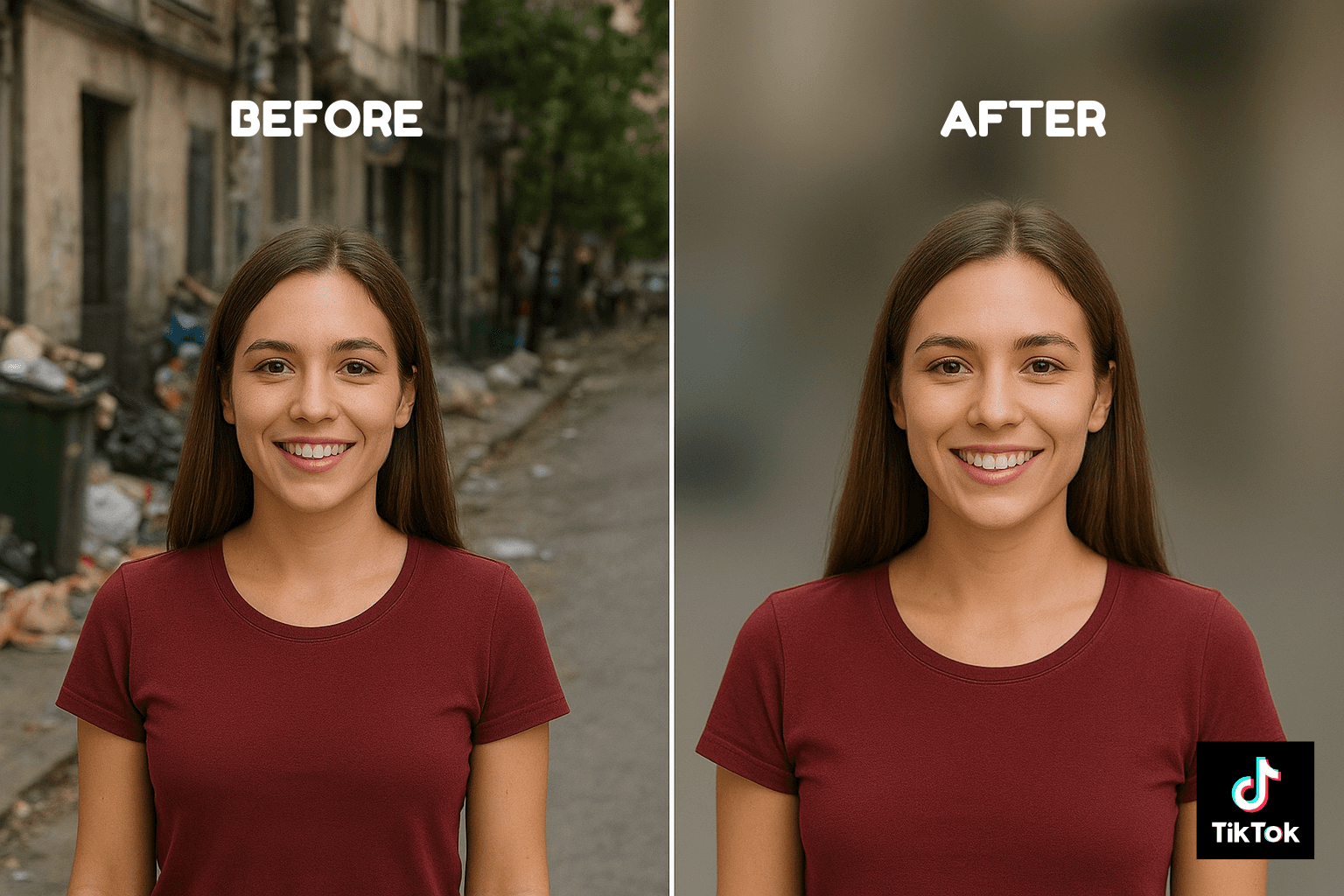
This is where BGBlur also becomes a content quality tool, not just a privacy tool. The background blur video feature transforms distracting or messy environments into clean, professional-looking content by applying a soft blur to everything behind the subject creating that bokeh effect that photographers and videographers spend thousands on camera equipment to achieve.
Whether you're filming in a busy café, a cluttered bedroom, a busy office floor, or any environment where the background is visually noisy, the video background blur effect keeps viewers focused on you and what you're saying rather than scanning the background. It's a simple change that makes a significant difference in how polished your content looks.
The blur is applied intelligently the AI identifies the primary subject in the frame and keeps them sharp while softening everything behind them. You're not applying a flat blur to the entire frame; you're getting a depth-of-field effect that looks like it was achieved with professional camera equipment.
How BGBlur Works in Four Simple Steps
Getting a background blur of video done on BGBlur takes four steps and most users are done in under five minutes:
Step 1- Upload Your Video Head to BGBlur.com and drag your video file directly onto the upload area — no account creation required, no software to install, no compatibility issues. BGBlur runs entirely in your browser and works on any device. It accepts MP4, MOV, AVI, and all common video formats. For TikTok content specifically, your files are almost certainly in a supported format already.
Step 2- Select What to Blur Once your video is uploaded, BGBlur gives you clear options for what you want the AI to process: background blur, face blur, license plate blur, or a combination. For most TikTok use cases you'll want blur background of video selected, with face and plate blur added if your footage contains those. Selecting multiple options processes everything in a single pass — no need to run your video through separately for each type.
Step 3- Let the AI Process and Preview Hit Proceed and BGBlur's AI gets to work. It scans every frame, applies the selected blur effects with motion tracking, and generates a preview when it's done. Scrub through the preview to verify that backgrounds are properly blurred, faces are covered, and plates are obscured. If anything was missed which is rare you can manually mark the region before finalizing.
Step 4- Download and Use Once you're happy with the preview, download your processed video. It saves at its original resolution with all blur effects applied, ready to upload directly to TikTok, Instagram Reels, YouTube Shorts, or wherever you're posting. The whole process from upload to download typically takes two to five minutes.
Why BGBlur Outperforms Traditional Video Editors
Motion Tracking Technology
This is the feature that separates BGBlur from basic blur tools. Traditional editors apply blur to a fixed region — you draw a box, and the blur stays in that exact position regardless of what happens in the next frame. For any footage with movement, this means the blur immediately becomes inaccurate the moment something shifts.
BGBlur's motion tracking locks onto detected subjects whether that's a face, a license plate, or a background region — and follows them through the video as they move. A person walking through your background gets blurred throughout their entire appearance. A car driving across the frame has its plate blurred continuously from the moment it enters to the moment it leaves. This is what makes the video blur background effect look natural rather than like a static overlay slapped on top of the footage.
Batch Processing for High-Volume Creators
For content creators managing multiple videos daily posting schedules, content series, behind-the-scenes footage, product content processing files one at a time gets tedious fast. BGBlur's batch processing lets you upload multiple files and process them together, applying the same blur settings across all of them simultaneously. For creators producing high volumes of TikTok content, this turns a potential daily chore into something that runs in the background while you do other things.
Platform-Optimized Exports
TikTok has specific requirements for video format, resolution, and file size. BGBlur's export is optimized for these specifications, meaning you're not downloading a file and then having to convert or compress it further before uploading. The video comes out ready to post.
No App Download Required
A lot of mobile video editing apps that offer background blur functionality require you to download an app, create an account, grant extensive permissions to your camera roll, and often subscribe before accessing key features. BGBlur bypasses all of that it's browser-based, which means it works on iPhone, Android, Mac, Windows, or any device with an internet connection and a browser. For creators who switch between devices or don't want another app taking up storage, this is a real practical advantage.
Real-World Applications for TikTok Creators
Street Interviews and Vlogs
Street content is some of the most engaging content on TikTok but it's also where privacy issues come up most frequently. Passersby, storefront customers, residential areas, vehicle traffic all of it ends up in the frame. Running this footage through BGBlur before posting handles all of it automatically: background blur video for general environmental cleanup, face blur for unintentional bystanders, plate blur for vehicle traffic.
Driving and Travel Content
Road trip videos, city drives, travel vlogs filmed from moving vehicles this content captures license plates constantly. A five-minute clip of driving through a city might have 50 or more plates visible across all the vehicles around you. BGBlur's automatic detection processes all of them without you having to identify a single one manually.
Home Tours and Room Content
TikTok has a huge appetite for home content interior design, room makeovers, organization tips, cooking content. A lot of creators are comfortable sharing some parts of their home but not others. The video blur background feature lets you film in spaces where the background contains things you don't want visible personal mail, family photos, documents, items that identify your location and clean them up before posting without reshooting.
Workplace and Behind-the-Scenes Content
Behind-the-scenes content performs well across almost every creator niche. But workplaces contain confidential information whiteboards, screens, documents, colleagues who haven't consented to appearing in content. BGBlur lets you share authentic behind-the-scenes footage while keeping sensitive information and people protected. The background blur in video combined with face blur handles both issues in a single pass.
Product Reviews and Demonstrations
For creators who film product content at home, blur background of video turns any space into a clean, professional-looking filming environment. Instead of needing a dedicated filming setup with controlled backgrounds, you can film wherever is convenient and use BGBlur to remove the visual noise behind your subject. The result looks intentional and polished rather than improvised.
The AI Advantage: Why BGBlur Gets Better Over Time
As an AI-powered video background blur solution, BGBlur uses machine learning models that improve with use. Detection accuracy for faces, license plates, and background segmentation improves as the models process more varied footage different lighting conditions, different environments, different subject types.
This is different from a traditional software filter, which does exactly the same thing every time regardless of the input. The AI approach means that edge cases unusual lighting, partial obstructions, fast movement, challenging angles are handled better over time as the model encounters and learns from more examples of them.
For creators, this means the tool gets more accurate the longer it's been in the market not less. Updates to the underlying models improve performance without requiring any action on your end. You just keep uploading and getting better results.
Frequently Asked Questions
Can I use BGBlur as a free tool? Yes. BGBlur offers a free plan that supports videos up to 200MB and 10 minutes in length which covers the vast majority of TikTok content. For longer videos or higher-volume processing, paid plans are available.
Does BGBlur work on existing TikTok videos? Absolutely. You can download any video from TikTok, upload it to BGBlur, apply your chosen blur effects, and re-upload the processed version. This is useful for cleaning up older content or for processing videos that were filmed and saved before you had a blur workflow in place.
How accurate is the face and license plate detection? BGBlur's AI achieves over 95% accuracy on standard footage for both face and plate detection. Motion tracking ensures that detections stay accurate as subjects move through the frame. For edge cases where something is missed, the manual markup tool lets you flag it before exporting.
Will the background blur affect my video quality? No. BGBlur processes and exports in HD quality, preserving your video's original resolution. The background blur in video effect is applied as an overlay the underlying footage quality is not changed or compressed by the blur itself.
How long does processing take? For a standard TikTok-length clip (under 3 minutes at 1080p), processing typically completes in 2–4 minutes. Longer clips or 4K footage may take slightly longer. Batch processing runs multiple files simultaneously rather than sequentially.
Can I blur backgrounds and faces in the same video? Yes. BGBlur lets you select multiple blur types in a single processing pass background blur, face blur, and license plate blur can all be applied to the same video at once. No need to run the video through multiple times.
Conclusion
Privacy protection in TikTok videos is no longer optional it's an essential part of responsible content creation. And beyond privacy, video background blur is one of the simplest ways to elevate the production quality of your content without changing anything about how you film.
BGBlur handles both in one tool, in minutes, without requiring any editing knowledge or software downloads. The AI does the detection and tracking. You upload, select, and download. That's the entire workflow.
For creators who post regularly especially those filming in public spaces, driving content, or any environment where backgrounds contain things that shouldn't be in the final video having a reliable background blur video tool in your workflow isn't a nice-to-have. It's how you protect yourself, protect the people who appear in your content, and consistently put out polished, professional-looking videos without spending hours in an editor.