AI-Powered Background Remover for Images & Videos
Automatically process images and videos using advanced AI detection and editing workflows. Background Remover reduces manual work while delivering clean, professional, and privacy-ready results.

AI-Powered Background Remover
Background Remover helps you finish the core task faster while keeping subjects and details crisp.
How Background Remover Works
Background Remover turns a complex manual workflow into a focused browser flow. Upload the file, let the tool do the heavy lifting, and export a result that is easier to share, review, or publish.
Use it when you need a faster way to prepare content for public pages, reports, client review, training material, social posts, or internal documentation without rebuilding the edit by hand.
Replace background scenes with clean branded visuals
Keep the subject sharp while changing the environment
Work with solid colors, gradients, or custom images
Create product, campaign, and social assets faster
Export transparent or finished background variants
Remove manual compositing from repeat design tasks
Use Cases

E-commerce
Give product photos a consistent look. keeps this workflow practical for repeated review, privacy cleanup, publishing, and team handoff without forcing editors to rebuild every mask or adjustment manually.
Social Media
Create on-brand visuals quickly. keeps this workflow practical for repeated review, privacy cleanup, publishing, and team handoff without forcing editors to rebuild every mask or adjustment manually.
Real Estate
Prepare cleaner listing images. keeps this workflow practical for repeated review, privacy cleanup, publishing, and team handoff without forcing editors to rebuild every mask or adjustment manually.
Marketing
Test different background styles. keeps this workflow practical for repeated review, privacy cleanup, publishing, and team handoff without forcing editors to rebuild every mask or adjustment manually.
Creators
Build thumbnails faster. keeps this workflow practical for repeated review, privacy cleanup, publishing, and team handoff without forcing editors to rebuild every mask or adjustment manually.
Teams
Standardize creative output. keeps this workflow practical for repeated review, privacy cleanup, publishing, and team handoff without forcing editors to rebuild every mask or adjustment manually.
Fast Creative Workflow
Background Remover is designed for quick uploads, fast processing, and a clean result without a complicated editing timeline.
Ready to try Background Remover?
Upload a file and generate a cleaner result with background remover in seconds.
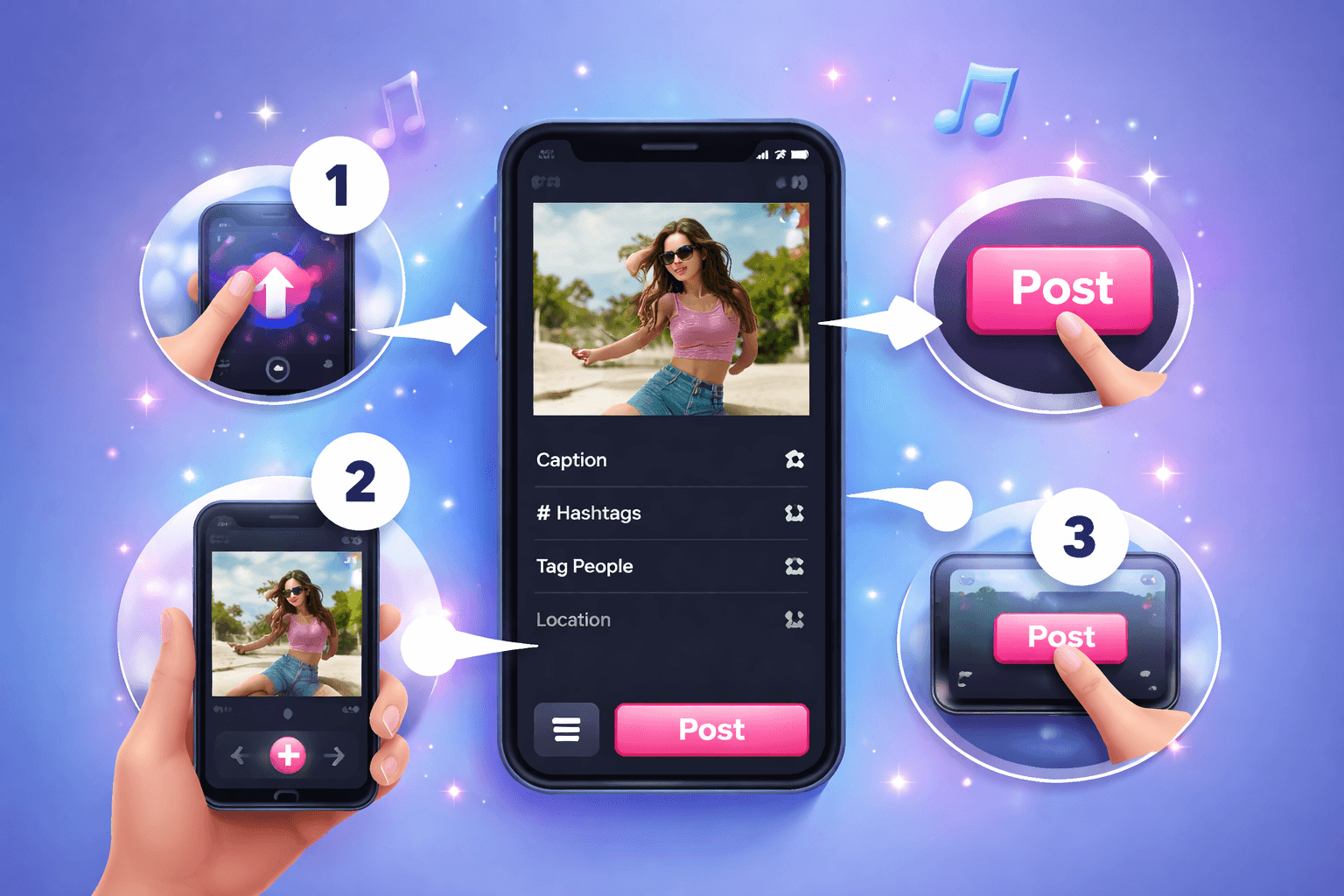
How to Easily Use Background Remover
Follow this simple 3-step process to get a polished result without frame-by-frame editing.
Upload Your Video
Start by uploading the video you want to process. The background remover workflow keeps the setup simple, so you can move from file selection to preview without rebuilding the project manually.
Review the AI Preview
BGBlur analyzes the file and prepares the right privacy edits for background remover. Check the preview, confirm the important areas, and adjust the result before exporting.
Download the Result
Export a clean, privacy-safe version when the preview looks right. The finished video is ready for sharing, publishing, archiving, or handing off to your team.
AI editing features
More than a Background Remover tool
Background Remover helps you move from upload to clean export with practical AI-assisted editing, review, and privacy controls.

AI-assisted detection
Find important regions faster and reduce manual setup work.

Browser workflow
Upload, review, adjust, and export without installing editing software.

Privacy-first output
Create safer media for publishing, review, reporting, and team handoff.
What Our Users Say
Join teams and creators who use BGBlur tools for faster privacy-safe media workflows.
“Background Remover helps us prepare privacy-safe media quickly without rebuilding edits by hand.”
“The workflow is fast enough for repeat review tasks and simple enough for the whole team to use.”
“BGBlur keeps sensitive visual details protected while preserving the useful context in our footage.”
Frequently Asked Questions
Answers to common questions about using Background Remover for image and video editing, privacy protection, export quality, and browser-based AI workflows.
Upload your media, review the AI-assisted preview, adjust the result when needed, and export a clean file from the browser.
Most BGBlur tools support practical image and video privacy workflows. The upload flow will guide you based on the file type you choose.
BGBlur is designed for privacy-first processing. Files are handled securely for the editing workflow and are not kept as permanent public assets.
No. The workflow runs in the browser, so you can upload, preview, adjust, and download without opening a timeline editor.
User Reviews
Share your experience and help others make informed decisions
Write a Review
All Reviews (0)
No reviews yet
Be the first to share your experience and help others discover this tool!
Background editing tools
Related tools for backgrounds, objects, and masks
Switch from background cleanup to object blur, AI mask detection, and video editing when your media needs more than one privacy pass.
Start with BGBlur
Smart AI Background Remover for Images & Videos
Background Remover helps creators edit images and videos faster with smart AI-powered automation. Upload your file, choose the privacy or blur workflow you need, and export polished content without manual frame-by-frame editing.
Remove backgrounds from images and video frames quickly and accurately for transparent exports.
Try Background Remover